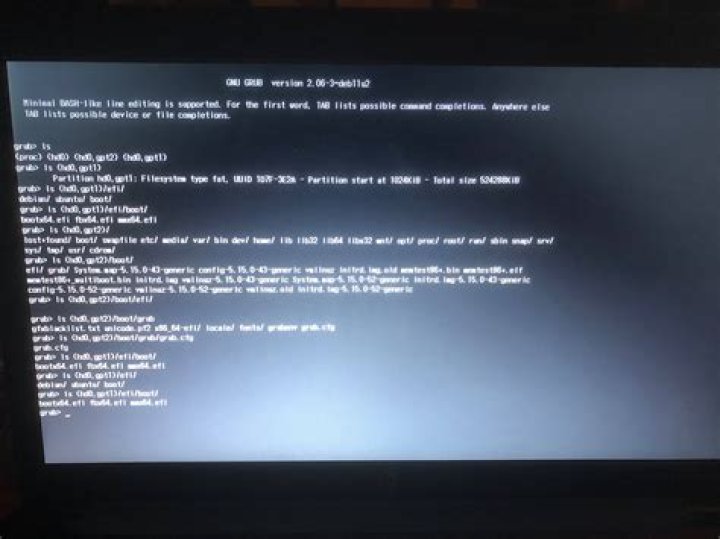
This is what I see:
GNU GRUB version 2.02~beta2-9ubuntu1 Minimal BASH-like line editing is supported. For the first word, TAB lists possible command completions. Anywhere else TAB lists possible device or file completions. grub> _ What should I do now?
108 Answers
I copied from eli's answer in Unix forum
Cause: boot process can't find the root partition
Solution
Please type ls This will show all partitions, and then type individual
ls (hd0,1)/ ls (hd0,2)/ ... and so on, until you find like
(hd0,1)/boot/grub or (hd0,1)/grub
In case of EFI,
(hd0,1)/efi/boot/grub or (hd0,1)/efi/grub... now set the boot parameters accordingly, just type this with your number
set prefix=(hd0,1)/grub set root=(hd0,1) insmod linux insmod normal normal now it would boot and please open the Terminal and put this command line
sudo update-grub ... it should boot correctly in the next time. If not, you have to go through the steps again. In other case, you might have to repair or install grub again, please look at this article.
My SW: Windows 10 and Ubuntu 16.04 dual boot
HW: HP Pavilion 15t
7You got a problem with the bootloader. You should initialize kernel. First use command ls, then adjust the following commands according to it. In the place of hd0 write your disk and in 1 write your number.
grub> set root=(hd0,1) grub> linux /vmlinuz-4.4.0-38-generic grub> initrd /initrd.img-4.4.0-38-generic grub> boot If you don't know what your version of the kernel is, write:
grub> linux /vmlTab
grub> initrd /inTab
FIRST try only grub> boot
Not a permanent fix, but you should be able to continue just by exiting:
grub> exit This will continue to either the grub menu (if you have a dual boot system) where you can choose which OS you want to boot, or directly to your primary operating system. This is a common problem with dual booting a system with UEFI bootloader.
1When trying to install ubuntu 20.04.2.0 on hp pavilion I got the same. Used ESC + F9 to launch BIOS boot menu, I found both windows and Ubuntu. Both worked fine.
I ran into this issue today, I have Linux installed alongside windows and I wanted to remove ubuntu and I directly deleted the partition from windows from disk management on windows 10 without actually deleting the grub menu. As a result whenever I rebooted the system I would see that black screen with that the grub terminal.This basicall happens when the system couldn’t find a OS to boot from so it would go into that grub terminal. so what you need to do is modify your boot order.
- boot your system by entering the command “reboot”.
- keep pressing F2 inorder to go into bios, This key varies based on the make of your device in my case I was using a Lenovo ideapad so it would work.
- Once you have the bios menu using the arrow keys go to “boot” section then you need to change the boot order under “EFI” by pressing f5,f6 keys in my case I deleted the ubuntu partition so I moved the windows to top.

- after you change the boot order press f10 to save and exit and your system will boot into your desired OS (windows in my case).
FYI, for anyone stumbling upon this post now - I got stuck in grub >, and grub > ls wasn't producing anything.
grub > boot produced:
error: you need to load kernel first Unplugging the USB mouse and restarting fixed it.
For Ubuntu 21.04, after a boot repair from usb, I got
grub> insmod all_video grub> insmod linux grub> linux /boot/vmlinuz root=/dev/sda2 grub> initrd /boot/initrd.img grub> boot
And. . . Booted!!!
1grub> ls Get the data members
grub> ls (hd0,gpt2)/ grub> ls (hd0,gpt2)/boot grub> set root=(hd0,gpt2) linux /boot/vmlinuz-4.15.0-20