I have a problem with a bash script.
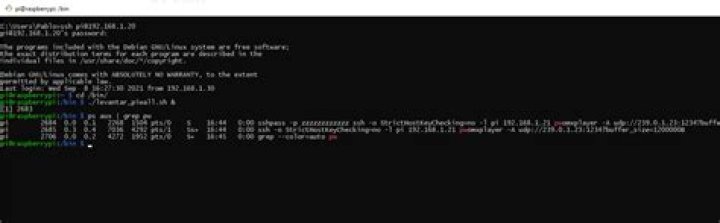
#!/bin/bash USERNAME=pi HOSTS="192.168.1.21 192.168.1.22 192.168.1.23 192.168.1.24 192.168.1.25 192.168.1.26 192.168.1.27 192.168.1.28 192.168.1.29" SCRIPT="pwomxplayer -A udp://239.0.1.23:1234?buffer_size=1200000B" for HOSTNAME in ${HOSTS} ; do sshpass -p 'Nasanasa0401' ssh -o StrictHostKeyChecking=no -l ${USERNAME} ${HOSTNAME} "${SCRIPT}" done The problem is that it takes a long time to execute the command in the following ip and when I look at the services on the raspberry pi master where the bash is running I notice that I have two services running and one says zzzzzzzzzz
Does anyone realize that I may be doing wrong?
The following attempt works fine:
#!/bin/bash USERNAME=pi HOSTS="192.168.1.21 192.168.1.22 192.168.1.23 192.168.1.24 192.168.1.25 192.168.1.26 192.168.1.27 192.168.1.28 192.168.1.29" SCRIPT="sudo killall pwomxplayer.bin" for HOSTNAME in ${HOSTS} ; do sshpass -p Nasanasa0401 ssh -o StrictHostKeyChecking=no -l ${USERNAME} ${HOSTNAME} "${SCRIPT}" done 
1 Answer
My guess would be that in the working example the "killall" will return very quickly on each node, while in the non-working example the pwomxplayer on the first node never returns, so it doesn't even start the one on the second.
Have a look at the man page of ssh, and in particular at the "-f" parameter that'll force it to go into background after starting the desired command.
1