I'm trying to set the Coolbits in 20.04 in order to gain manual gpu fan control.
I edited the nvidia the X configuration file 10-nvidia.conf already present in /usr/share/X11:
Section "OutputClass" Identifier "nvidia" MatchDriver "nvidia-drm" Driver "nvidia" Option "AllowEmptyInitialConfiguration" Option "Coolbits" "28" ModulePath "/usr/lib/x86_64-linux-gnu/nvidia/xorg" EndSection Note that I just added Option "Coolbits" "28"
This didn't have any effect whatsoever.
What is the correct way of setting the coolbits in 20.04, given my configuration?
4 Answers
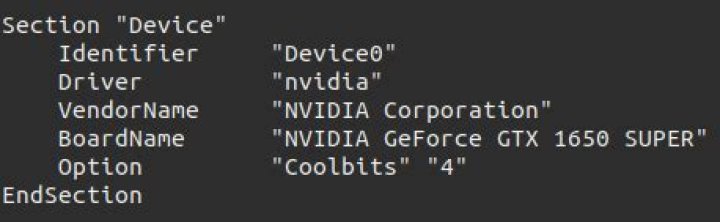
From my understanding, coolbits option should be in Section "Device" and not Section "OutputClass".
For only manual GPU fan control, you can set coolbits to 4. 28 also works, as it's 16+8+4 (each being a different bit in binary), giving you two more sets of options as well (I think one is overvoltage (16), and the other is to change performance settings per clock (8).
2You're on the right track. It's Option "Coolbits" "13". Also, my conf file is xorg.conf at /ect/x11 (you can generate one with nvidia-xconfig). It looks like this:
# nvidia-xconfig: X configuration file generated by nvidia-xconfig # nvidia-xconfig: version 455.28 # nvidia-settings: X configuration file generated by nvidia-settings # nvidia-settings: version 440.82 # nvidia-xconfig: X configuration file generated by nvidia-xconfig # nvidia-xconfig: version 435.21 Section "ServerLayout" Identifier "Layout0" Screen 0 "Screen0" 0 0 InputDevice "Keyboard0" "CoreKeyboard" InputDevice "Mouse0" "CorePointer" Option "Xinerama" "0" EndSection Section "Files" EndSection Section "InputDevice" # generated from default Identifier "Mouse0" Driver "mouse" Option "Protocol" "auto" Option "Device" "/dev/psaux" Option "Emulate3Buttons" "no" Option "ZAxisMapping" "4 5" EndSection Section "InputDevice" # generated from default Identifier "Keyboard0" Driver "kbd" EndSection Section "Monitor" Identifier "Monitor0" VendorName "Unknown" ModelName "Microstep MSI G241" HorizSync 180.0 - 180.0 VertRefresh 48.0 - 144.0 Option "DPMS" EndSection Section "Device" Identifier "Device0" Driver "nvidia" VendorName "NVIDIA Corporation" BoardName "GeForce GTX 1070" Option "Coolbits" "13" EndSection Section "Screen" Identifier "Screen0" Device "Device0" Monitor "Monitor0" DefaultDepth 24 Option "TripleBuffer" "On" Option "Stereo" "0" Option "nvidiaXineramaInfoOrder" "DFP-6" Option "metamodes" "DP-4: 1920x1080_144 +0+0 {AllowGSYNCCompatible=On}, HDMI-0: 1920x1080_60 +1920+0" Option "SLI" "Off" Option "MultiGPU" "Off" Option "BaseMosaic" "off" SubSection "Display" Depth 24 EndSubSection EndSection TLDR:
In /etc/X11/Xwrapper.config add:
allowed_users = anybody needs_root_rights = yes and change permissions:
chmod 2644 /etc/X11/Xwrapper.config I got this working in a multi GPU config with 470.63.01 drivers. I thought that the problem was with Coolbits, but it actually was the Xwrapper.config (by the way, I set the Coolbits in /etc/X11/xorg.conf).
I'm not sure why the command:
sudo nvidia-xconfig -a --cool-bits=16 --allow-empty-initial-configuration breaks your X. For me it worked, and X is behaving normally so far. I'm using the default GNOME and multiple desktops. I cannot assist you with this, however, because it was not the problem. This command added a bunch of lines to the /etc/X11/xorg.conf file, containing 3 entries for each GPU, that look like this:
Section "Monitor" Identifier "Monitor1" VendorName "Unknown" ModelName "Unknown" Option "DPMS" EndSection ... Section "Device" Identifier "Device1" Driver "nvidia" VendorName "NVIDIA Corporation" BoardName "NVIDIA GeForce xxxxxxx" BusID "PCI:x:0:0" EndSection ... Section "Screen" Identifier "Screen1" Device "Device1" Monitor "Monitor1" DefaultDepth 24 Option "AllowEmptyInitialConfiguration" "True" Option "Coolbits" "16" SubSection "Display" Depth 24 EndSubSection EndSection Even after applying the command, the fan setting won't work unless the /etc/X11/Xwrapper.config file is edited. I had to add the following lines:
allowed_users = anybody needs_root_rights = yes Then save it and change the permissions:
chmod 2644 /etc/X11/Xwrapper.config Adding these lines and rebooting did the trick for me. Without them, nvidia-settings just fails. I found this solution here.
I'm using Ubuntu 20.04 with Nvidia Driver 470.63.01.
In Terminal run:
sudo nano /etc/X11/xorg.confUnder
Section "Device"add this line:Option "Coolbits" "4"It should look something like this:
Press and hold Ctrl and then O to write out (save) the file, then press and hold Ctrl and x to exit
nanoback to Terminal.Then in Terminal:
sudo nano /etc/X11/Xwrapper.configAdd
#to the following line (the#means it's just a comment now, not a parameter)# allowed_users=consoleAdd these two lines:
allowed_users = anybody needs_root_rights = yes
Ctrl + O to write out (save). Ctrl + x to exit
nano.Then in Terminal:
sudo chmod 2644 /etc/X11/Xwrapper.configReboot your computer.