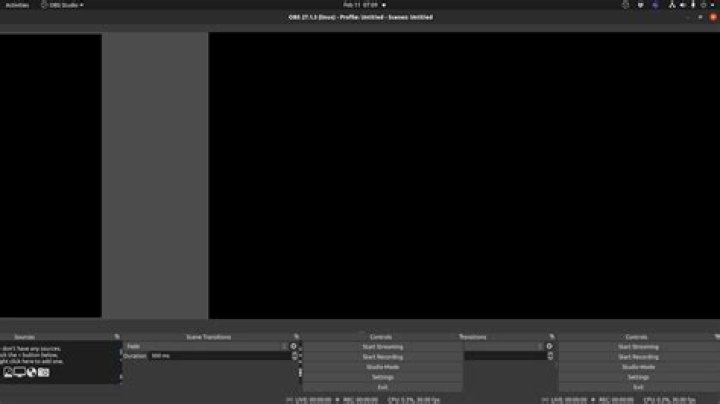
I recorded 100+ educational videos last year using OBS on ubuntu so I generally have a decent idea how to use the program. Having not used it for a hot minute, I decided to run it to setup a new project I'm working on. When I did each of the panels at the bottom were doubled. Not just controls, but audio, sources, scene transitions, etc and they are overlapping each-other in a rather glitchy fashion. This renders the program useless for me.
So I figured it was probably a config file mismatch from different versions. I decided to bork the config and $rm -rf .config/obs-studio and restarted. Same result. This was the ppa version. So I apt purged it, cleared the user config again, removed the ppa and installed the debian package version.
Same results! So I again cleared the config purged and tried the snap version. This again had the same results.
I ran it from the terminal to see if there were any glaring errors. The Failed to load 'en-US' text for module: 'decklink-ouput-ui.so' warning stuck out but apparently is not a problem for most people. I only did this in the debian repo version
$obs Attempted path: share/obs/obs-studio/locale/en-US.ini Attempted path: /usr/share/obs/obs-studio/locale/en-US.ini Attempted path: share/obs/obs-studio/locale.ini Attempted path: /usr/share/obs/obs-studio/locale.ini Attempted path: share/obs/obs-studio/themes/Dark.qss Attempted path: /usr/share/obs/obs-studio/themes/Dark.qss info: CPU Name: Intel(R) Core(TM) i9-9900K CPU @ 3.60GHz info: CPU Speed: 3600.000MHz info: Physical Cores: 8, Logical Cores: 16 info: Physical Memory: 32037MB Total, 25550MB Free info: Kernel Version: Linux 5.13.0-28-generic info: Distribution: "Ubuntu" "20.04" info: Window System: X11.0, Vendor: The X.Org Foundation, Version: 1.20.13 info: Portable mode: false Attempted path: share/obs/obs-studio/themes/Dark/no_sources.svg Attempted path: /usr/share/obs/obs-studio/themes/Dark/no_sources.svg QMetaObject::connectSlotsByName: No matching signal for on_advAudioProps_clicked() QMetaObject::connectSlotsByName: No matching signal for on_advAudioProps_destroyed() QMetaObject::connectSlotsByName: No matching signal for on_actionGridMode_triggered() QMetaObject::connectSlotsByName: No matching signal for on_program_customContextMenuRequested(QPoint) info: OBS 25.0.3+dfsg1-2 (linux) info: --------------------------------- info: --------------------------------- info: audio settings reset: samples per sec: 44100 speakers: 2 info: --------------------------------- info: Initializing OpenGL... info: Loading up OpenGL on adapter ATI Technologies Inc. AMD Radeon Pro W5500 info: OpenGL loaded successfully, version 3.3.14756 Core Profile Context FireGL, shading language 4.60 info: --------------------------------- info: video settings reset: base resolution: 1920x1080 output resolution: 1280x720 downscale filter: Bicubic fps: 30/1 format: NV12 YUV mode: 601/Partial info: NV12 texture support not available info: Audio monitoring device: name: Default id: default info: --------------------------------- warning: Failed to load 'en-US' text for module: 'decklink-ouput-ui.so' libDeckLinkAPI.so: cannot open shared object file: No such file or directory warning: A DeckLink iterator could not be created. The DeckLink drivers may not be installed info: No blackmagic support error: os_dlopen(libnvidia-encode.so.1->libnvidia-encode.so.1): libnvidia-encode.so.1: cannot open shared object file: No such file or directory info: FFMPEG VAAPI supported info: VLC found, VLC video source enabled info: --------------------------------- info: Loaded Modules: info: vlc-video.so info: text-freetype2.so info: rtmp-services.so info: obs-x264.so info: obs-transitions.so info: obs-outputs.so info: obs-filters.so info: obs-ffmpeg.so info: linux-v4l2.so info: linux-pulseaudio.so info: linux-jack.so info: linux-decklink.so info: linux-capture.so info: linux-alsa.so info: image-source.so info: frontend-tools.so info: decklink-ouput-ui.so info: --------------------------------- info: ==== Startup complete =============================================== error: Service '' not found info: No scene file found, creating default scene info: All scene data cleared info: ------------------------------------------------ info: pulse-input: Server name: 'pulseaudio 13.99.1' info: pulse-input: Audio format: s16le, 44100 Hz, 2 channels info: pulse-input: Started recording from 'alsa_output.pci-0000_00_1f.3.analog-stereo.monitor' info: pulse-input: Server name: 'pulseaudio 13.99.1' info: pulse-input: Audio format: s16le, 44100 Hz, 1 channels info: pulse-input: Started recording from 'alsa_input.usb-AONI_ELECTRONIC_CO.LTD_NexiGo_N930AF_FHD_webcam_20200924003-02.mono-fallback' info: Switched to scene 'Scene' warning: Failed to glob scene collections Attempted path: share/obs/obs-studio/images/overflow.png Attempted path: /usr/share/obs/obs-studio/images/overflow.png warning: [rtmp-services plugin] Update file 'services.json' (version 188) rejected warning: [rtmp-services plugin] Successfully updated package (version 188) info: adding 46 milliseconds of audio buffering, total audio buffering is now 46 milliseconds (source: Mic/Aux) info: ==== Shutting down ================================================== info: Switched to scene '(null)' info: pulse-input: Stopped recording from 'alsa_output.pci-0000_00_1f.3.analog-stereo.monitor' info: pulse-input: Got 2850 packets with 613510 frames info: pulse-input: Stopped recording from 'alsa_input.usb-AONI_ELECTRONIC_CO.LTD_NexiGo_N930AF_FHD_webcam_20200924003-02.mono-fallback' info: pulse-input: Got 1573 packets with 695766 frames info: All scene data cleared info: ------------------------------------------------ info: Freeing OBS context data info: [Scripting] Total detached callbacks: 0 info: == Profiler Results ============================= info: run_program_init: 12523.4 ms info: ┣OBSApp::AppInit: 1.303 ms info: ┃ ┗OBSApp::InitLocale: 0.462 ms info: ┗OBSApp::OBSInit: 12463 ms info: ┣obs_startup: 21.155 ms info: ┗OBSBasic::OBSInit: 12407.3 ms info: ┣OBSBasic::InitBasicConfig: 0.192 ms info: ┣OBSBasic::ResetAudio: 0.046 ms info: ┣OBSBasic::ResetVideo: 33.599 ms info: ┣OBSBasic::InitOBSCallbacks: 0.002 ms info: ┣OBSBasic::InitHotkeys: 0.02 ms info: ┣obs_load_all_modules: 45.399 ms info: ┃ ┣obs_init_module(decklink-ouput-ui.so): 0.354 ms info: ┃ ┣obs_init_module(frontend-tools.so): 20.834 ms info: ┃ ┣obs_init_module(image-source.so): 0.003 ms info: ┃ ┣obs_init_module(linux-alsa.so): 0.001 ms info: ┃ ┣obs_init_module(linux-capture.so): 0.186 ms info: ┃ ┣obs_init_module(linux-decklink.so): 0.06 ms info: ┃ ┣obs_init_module(linux-jack.so): 0.001 ms info: ┃ ┣obs_init_module(linux-pulseaudio.so): 0.001 ms info: ┃ ┣obs_init_module(linux-v4l2.so): 0.001 ms info: ┃ ┣obs_init_module(obs-ffmpeg.so): 0.127 ms info: ┃ ┃ ┗nvenc_check: 0.115 ms info: ┃ ┣obs_init_module(obs-filters.so): 0.017 ms info: ┃ ┣obs_init_module(obs-outputs.so): 0.001 ms info: ┃ ┣obs_init_module(obs-transitions.so): 0.006 ms info: ┃ ┣obs_init_module(obs-x264.so): 0.001 ms info: ┃ ┣obs_init_module(rtmp-services.so): 0.098 ms info: ┃ ┣obs_init_module(text-freetype2.so): 0.021 ms info: ┃ ┗obs_init_module(vlc-video.so): 0.549 ms info: ┣OBSBasic::ResetOutputs: 0.071 ms info: ┣OBSBasic::CreateHotkeys: 0.017 ms info: ┣OBSBasic::InitService: 0.75 ms info: ┣OBSBasic::InitPrimitives: 0.057 ms info: ┗OBSBasic::Load: 4.061 ms info: obs_hotkey_thread(25 ms): min=0.042 ms, median=0.228 ms, max=8.542 ms, 99th percentile=3.239 ms, 100% below 25 ms info: audio_thread(Audio): min=0 ms, median=0.019 ms, max=0.111 ms, 99th percentile=0.091 ms info: obs_graphics_thread(33.3333 ms): min=0.121 ms, median=0.48 ms, max=12.162 ms, 99th percentile=2.72 ms, 100% below 33.333 ms info: ┣tick_sources: min=0 ms, median=0.002 ms, max=6.245 ms, 99th percentile=0.005 ms info: ┣output_frame: min=0.056 ms, median=0.06 ms, max=0.189 ms, 99th percentile=0.121 ms info: ┃ ┗gs_context(video->graphics): min=0.056 ms, median=0.06 ms, max=0.189 ms, 99th percentile=0.121 ms info: ┃ ┣render_video: min=0.03 ms, median=0.033 ms, max=0.145 ms, 99th percentile=0.073 ms info: ┃ ┃ ┗render_main_texture: min=0.028 ms, median=0.03 ms, max=0.141 ms, 99th percentile=0.069 ms info: ┃ ┗gs_flush: min=0.017 ms, median=0.019 ms, max=0.044 ms, 99th percentile=0.036 ms info: ┗render_displays: min=0.007 ms, median=0.399 ms, max=11.929 ms, 99th percentile=2.087 ms info: ================================================= info: == Profiler Time Between Calls ================== info: obs_hotkey_thread(25 ms): min=25.109 ms, median=25.365 ms, max=33.602 ms, 94.6117% within ±2% of 25 ms (0% lower, 5.38827% higher) info: obs_graphics_thread(33.3333 ms): min=33.188 ms, median=33.334 ms, max=33.479 ms, 100% within ±2% of 33.333 ms (0% lower, 0% higher) info: ================================================= info: Number of memory leaks: 1 The only major thing that has changed that I can think of is I switched to using the AMD driver for my AMD Radeon Pro W5500. That's what I will try next if I can't figure anything else out. I hope you understand that switching my graphics subsystem is not something I do lightly. So I'm hoping someone can think of something else it might be or confirm other people without the silly graphics drivers are getting a similar problem.
Cheers
Edit: I forgot to mention. If you undock the settings panel from the bottom there is only one and the duplicates disappear.
Updates:
- Uninstalled amdgpu-pro drivers this morning and problem still persits.