
So I am on this problem for quite some time now. After setting up my printer it does not print at all!
I am putting the necessary information out here for anyone to give me some leads
The output of tail -f /var/log/syslog when I connect the USB of the printer:
Inspiron-5577 update-notifier.desktop[116391]: /var/cache/apt/archives/lock: Inspiron-5577 kernel: [ 5676.034111] usb 1-2: new high-speed USB device number 33 using xhci_hcd Inspiron-5577 kernel: [ 5676.185754] usb 1-2: New USB device found, idVendor=04a9, idProduct=271a, bcdDevice= 1.00 Inspiron-5577 kernel: [ 5676.185759] usb 1-2: New USB device strings: Mfr=1, Product=2, SerialNumber=3 Inspiron-5577 kernel: [ 5676.185762] usb 1-2: Product: Canon CAPT USB Device Inspiron-5577 kernel: [ 5676.185765] usb 1-2: Manufacturer: Canon Inspiron-5577 kernel: [ 5676.185767] usb 1-2: SerialNumber: 0000A1C5TEPh Inspiron-5577 kernel: [ 5676.189182] usblp 1-2:1.0: usblp1: USB Bidirectional printer dev 33 if 0 alt 0 proto 2 vid 0x04A9 pid 0x271A Inspiron-5577 systemd-udevd[116545]: 1-2: Process '/usr/lib/virtualbox/VBoxCreateUSBNode.sh 189 32 00' failed with exit code 1. Inspiron-5577 systemd[1]: Started Configure Plugged-In Printer. Inspiron-5577 udev-configure-printer: add usb-001-033 Inspiron-5577 udev-configure-printer: device devpath is /devices/pci0000:00/0000:00:14.0/usb1/1-2 Inspiron-5577 udev-configure-printer: MFG:Canon MDL:LBP6000/LBP6018 SERN:- serial:0000A1C5TEPh Inspiron-5577 kernel: [ 5682.147082] usblp1: removed Inspiron-5577 kernel: [ 5682.151195] usblp 1-2:1.0: usblp1: USB Bidirectional printer dev 33 if 0 alt 0 proto 2 vid 0x04A9 pid 0x271A Inspiron-5577 udev-configure-printer: URI contains USB serial number Inspiron-5577 udev-configure-printer: URI match: usb://Canon/LBP6000/LBP6018?serial=0000A1C5TEPh Inspiron-5577 udev-configure-printer: URI of detected printer: usb://Canon/LBP6000/LBP6018?serial=0000A1C5TEPh, normalized: canon lbp6000 lbp6018 serial 0000a1c5teph Inspiron-5577 udev-configure-printer: URI of print queue: ipp://Canone5f13e.local:631/ipp/print, normalized: ipp canone5f13e local 631 ipp print Inspiron-5577 udev-configure-printer: URI of print queue: ipps://EPSON869F11.local:631/ipp/print, normalized: ipps epson869f11 local 631 ipp print Inspiron-5577 udev-configure-printer: URI of print queue: ipps://EPSON869F11.local:631/ipp/print, normalized: ipps epson869f11 local 631 ipp print Inspiron-5577 udev-configure-printer: URI of print queue: usb://Canon/LBP6000/LBP6018?serial=0000A1C5TEPh, normalized: canon lbp6000 lbp6018 serial 0000a1c5teph Inspiron-5577 udev-configure-printer: Queue ipp://localhost/printers/LBP6000-LBP6018 has matching device URI Inspiron-5577 udev-configure-printer: Re-enabled printer ipp://localhost/printers/LBP6000-LBP6018 Inspiron-5577 udev-configure-printer: URI of print queue: cups-pdf:/, normalized: cups pdf Inspiron-5577 systemd[1]: : Succeeded. From the output above it seems it is correctly recognizing my printer.
The output of lsusb also gave:
Bus 001 Device 033: ID 04a9:271a Canon, Inc. LBP6000
The output sudo lpstat -s:
system default destination: LBP6000-LBP6018 device for Canon_MF633C_635C: ipp://Canone5f13e.local:631/ipp/print device for EPSON_L605_Series: ipps://EPSON869F11.local:631/ipp/print device for : ipps://EPSON869F11.local:631/ipp/print device for LBP6000-LBP6018: usb://Canon/LBP6000/LBP6018?serial=0000A1C5TEPh device for PDF: cups-pdf:/ So you can see it is the default set.
Output of sudo lpinfo -v:
network http network https network ipp file cups-brf:/ direct hp network ipps serial serial:/dev/ttyS4?baud=115200 direct usb://Canon/LBP6000/LBP6018?serial=0000A1C5TEPh direct hpfax file cups-pdf:/ network beh network lpd network socket network smb Output of ls -l /dev/usb/lp1 gives:
crw-rw---- 1 root lp 180 /dev/usb/lp1
The problem arises when I go to any text file and do the print option my syslog says:
Inspiron-5577 kernel: [ 6061.033928] usblp1: removed
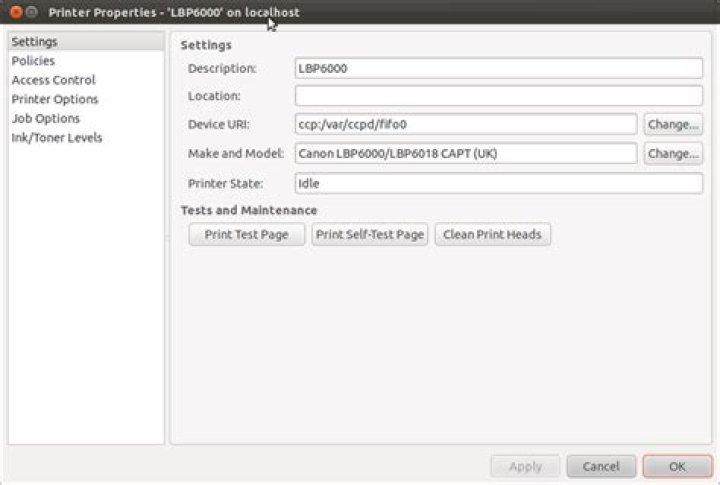
and in the settings of the ubuntu where the driver is shown which is a simple Generic CUPS-PDF printer driver (w/options) there the job is shown to always be in the "processing" state.
I do not have any clue now, maybe the cups log will show something? I am not sure.
Any leads after this will be appreciated.
EDIT
Output of lpstat -t as requested:
scheduler is running system default destination: LBP6000-LBP6018 device for Canon_MF633C_635C: ipp://Canone5f13e.local:631/ipp/print device for EPSON_L605_Series: ipps://EPSON869F11.local:631/ipp/print device for : ipps://EPSON869F11.local:631/ipp/print device for LBP6000-LBP6018: usb://Canon/LBP6000/LBP6018?serial=0000A1C5TEPh device for PDF: cups-pdf:/ Canon_MF633C_635C accepting requests since Sunday 05 May 2019 11:10:25 AM EPSON_L605_Series accepting requests since Friday 11 January 2019 12:12:31 PM accepting requests since Friday 11 January 2019 12:16:03 PM LBP6000-LBP6018 accepting requests since Tuesday 08 March 2022 10:26:49 AM PDF accepting requests since Tuesday 08 June 2021 02:34:05 PM printer Canon_MF633C_635C is idle. enabled since Sunday 05 May 2019 11:10:25 AM printer EPSON_L605_Series is idle. enabled since Friday 11 January 2019 12:12:31 PM printer is idle. enabled since Friday 11 January 2019 12:16:03 PM printer LBP6000-LBP6018 now printing LBP6000-LBP6018-20. enabled since Tuesday 08 March 2022 10:26:49 AM Sending data to printer. printer PDF is idle. enabled since Tuesday 08 June 2021 02:34:05 PM LBP6000-LBP6018-18 anonymous 1024 Tuesday 08 March 2022 12:39:55 AM LBP6000-LBP6018-20 aaryan 136192 Tuesday 08 March 2022 01:30:24 AM Actually I do not know what the 2 different "anonymous" and "aaryan" are for 18 and 20 though.
3 Reset to default