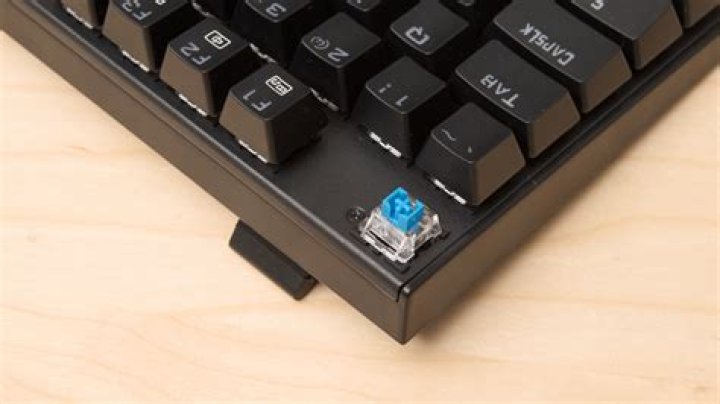

When I put on sleep my desktop computer, when I resume my keyboard (Aukey KM-G9) doesn't work. If I unplug and than plug it again, then it works. I'm currently using Ubuntu Gnome 17.04 but I've got the same problem with 16.04.
Edit: I've tried my old keyboard and It does work after suspend. I don't know why with my new I've got this strange issue. The new one is a mechanical keyboard.
Here's the lsusb output:
Bus 002 Device 003: ID 046d:c246 Logitech, Inc. Gaming Mouse G300 Bus 002 Device 002: ID 8087:0024 Intel Corp. Integrated Rate Matching Hub Bus 002 Device 001: ID 1d6b:0002 Linux Foundation 2.0 root hub Bus 006 Device 001: ID 1d6b:0003 Linux Foundation 3.0 root hub Bus 005 Device 002: ID 04d9:a0cd Holtek Semiconductor, Inc. Bus 005 Device 001: ID 1d6b:0002 Linux Foundation 2.0 root hub Bus 001 Device 002: ID 8087:0024 Intel Corp. Integrated Rate Matching Hub Bus 001 Device 001: ID 1d6b:0002 Linux Foundation 2.0 root hub Bus 004 Device 002: ID 04e8:6124 Samsung Electronics Co., Ltd D3 Station External Hard Drive Bus 004 Device 001: ID 1d6b:0003 Linux Foundation 3.0 root hub Bus 003 Device 001: ID 1d6b:0002 Linux Foundation 2.0 root hub Here's dmesg
[ 504.725733] PM: Restoring platform NVS memory [ 504.726015] Suspended for 3.327 seconds [ 504.726588] Enabling non-boot CPUs ... [ 504.737759] x86: Booting SMP configuration: [ 504.737760] smpboot: Booting Node 0 Processor 1 APIC 0x2 [ 504.740110] cache: parent cpu1 should not be sleeping [ 504.740186] microcode: sig=0x306a9, pf=0x2, revision=0x15 [ 504.740448] microcode: updated to revision 0x1c, date = 2015-02-26 [ 504.740515] CPU1 is up [ 504.749709] smpboot: Booting Node 0 Processor 2 APIC 0x4 [ 504.752082] cache: parent cpu2 should not be sleeping [ 504.752502] CPU2 is up [ 504.765719] smpboot: Booting Node 0 Processor 3 APIC 0x6 [ 504.768096] cache: parent cpu3 should not be sleeping [ 504.768917] CPU3 is up [ 504.771282] ACPI: Waking up from system sleep state S3 [ 504.790007] ehci-pci 0000:00:1a.0: System wakeup disabled by ACPI [ 504.790055] pcieport 0000:00:1c.7: System wakeup disabled by ACPI [ 504.790097] ehci-pci 0000:00:1d.0: System wakeup disabled by ACPI [ 504.790130] xhci_hcd 0000:00:14.0: System wakeup disabled by ACPI [ 504.790158] PM: noirq resume of devices complete after 18.442 msecs [ 504.790438] PM: early resume of devices complete after 0.248 msecs [ 504.790626] pcieport 0000:00:1c.4: System wakeup disabled by ACPI [ 504.790677] usb usb5: root hub lost power or was reset [ 504.790678] usb usb6: root hub lost power or was reset [ 504.792657] tg3 0000:03:00.0 enp3s0: Link is down [ 504.853346] rtc_cmos 00:02: System wakeup disabled by ACPI [ 504.853865] serial 00:06: activated [ 504.855289] sd 2:0:0:0: [sda] Starting disk [ 504.855304] sd 3:0:0:0: [sdb] Starting disk [ 505.167929] ata7: SATA link down (SStatus 0 SControl 300) [ 505.168077] ata8: SATA link down (SStatus 0 SControl 300) [ 505.227852] ata5: SATA link down (SStatus 0 SControl 300) [ 505.227868] ata6: SATA link down (SStatus 0 SControl 300) [ 505.227885] ata1: SATA link down (SStatus 0 SControl 300) [ 505.227904] ata2: SATA link down (SStatus 0 SControl 300) [ 505.227920] ata3: SATA link up 3.0 Gbps (SStatus 123 SControl 300) [ 505.228478] ata3.00: ACPI cmd ef/10:06:00:00:00:00 (SET FEATURES) succeeded [ 505.228480] ata3.00: ACPI cmd f5/00:00:00:00:00:00 (SECURITY FREEZE LOCK) filtered out [ 505.228482] ata3.00: ACPI cmd b1/c1:00:00:00:00:00 (DEVICE CONFIGURATION OVERLAY) filtered out [ 505.228708] ata3.00: supports DRM functions and may not be fully accessible [ 505.236331] ata3.00: disabling queued TRIM support [ 505.240993] ata3.00: ACPI cmd ef/10:06:00:00:00:00 (SET FEATURES) succeeded [ 505.240995] ata3.00: ACPI cmd f5/00:00:00:00:00:00 (SECURITY FREEZE LOCK) filtered out [ 505.240996] ata3.00: ACPI cmd b1/c1:00:00:00:00:00 (DEVICE CONFIGURATION OVERLAY) filtered out [ 505.241220] ata3.00: supports DRM functions and may not be fully accessible [ 505.248841] ata3.00: disabling queued TRIM support [ 505.249738] usb 5-1: reset full-speed USB device number 2 using xhci_hcd [ 505.253066] ata3.00: configured for UDMA/133 [ 505.253141] ata3.00: Enabling discard_zeroes_data [ 506.845522] ata4: SATA link up 3.0 Gbps (SStatus 123 SControl 300) [ 506.856069] ata4.00: ACPI cmd ef/10:06:00:00:00:00 (SET FEATURES) succeeded [ 506.856071] ata4.00: ACPI cmd f5/00:00:00:00:00:00 (SECURITY FREEZE LOCK) filtered out [ 506.856073] ata4.00: ACPI cmd b1/c1:00:00:00:00:00 (DEVICE CONFIGURATION OVERLAY) filtered out [ 506.915860] ata4.00: ACPI cmd ef/10:06:00:00:00:00 (SET FEATURES) succeeded [ 506.915863] ata4.00: ACPI cmd f5/00:00:00:00:00:00 (SECURITY FREEZE LOCK) filtered out [ 506.915865] ata4.00: ACPI cmd b1/c1:00:00:00:00:00 (DEVICE CONFIGURATION OVERLAY) filtered out [ 506.952740] ata4.00: configured for UDMA/133 [ 507.807435] tg3 0000:03:00.0 enp3s0: Link is up at 1000 Mbps, full duplex [ 507.807436] tg3 0000:03:00.0 enp3s0: Flow control is on for TX and on for RX [ 507.807438] tg3 0000:03:00.0 enp3s0: EEE is enabled [ 526.032945] usbhid 5-1:1.2: reset_resume error -110 [ 526.033090] PM: resume of devices complete after 21243.710 msecs [ 526.033301] PM: Finishing wakeup. [ 526.033302] Restarting tasks ... [ 526.033467] pci_bus 0000:05: Allocating resources [ 526.033487] pci 0000:04:00.0: bridge window [io 0x1000-0x0fff] to [bus 05] add_size 1000 [ 526.033490] pci 0000:04:00.0: bridge window [mem 0x00100000-0x000fffff 64bit pref] to [bus 05] add_size 200000 add_align 100000 [ 526.033493] pci 0000:04:00.0: bridge window [mem 0x00100000-0x000fffff] to [bus 05] add_size 200000 add_align 100000 [ 526.033497] pci 0000:04:00.0: res[14]=[mem 0x00100000-0x000fffff] res_to_dev_res add_size 200000 min_align 100000 [ 526.033499] pci 0000:04:00.0: res[14]=[mem 0x00100000-0x002fffff] res_to_dev_res add_size 200000 min_align 100000 [ 526.033501] pci 0000:04:00.0: res[15]=[mem 0x00100000-0x000fffff 64bit pref] res_to_dev_res add_size 200000 min_align 100000 [ 526.033503] pci 0000:04:00.0: res[15]=[mem 0x00100000-0x002fffff 64bit pref] res_to_dev_res add_size 200000 min_align 100000 [ 526.033505] pci 0000:04:00.0: res[13]=[io 0x1000-0x0fff] res_to_dev_res add_size 1000 min_align 1000 [ 526.033507] pci 0000:04:00.0: res[13]=[io 0x1000-0x1fff] res_to_dev_res add_size 1000 min_align 1000 [ 526.033510] pci 0000:04:00.0: BAR 14: no space for [mem size 0x00200000] [ 526.033511] pci 0000:04:00.0: BAR 14: failed to assign [mem size 0x00200000] [ 526.033514] pci 0000:04:00.0: BAR 15: no space for [mem size 0x00200000 64bit pref] [ 526.033515] pci 0000:04:00.0: BAR 15: failed to assign [mem size 0x00200000 64bit pref] [ 526.033517] pci 0000:04:00.0: BAR 13: no space for [io size 0x1000] [ 526.033518] pci 0000:04:00.0: BAR 13: failed to assign [io size 0x1000] [ 526.033521] pci 0000:04:00.0: BAR 14: no space for [mem size 0x00200000] [ 526.033523] pci 0000:04:00.0: BAR 14: failed to assign [mem size 0x00200000] [ 526.033525] pci 0000:04:00.0: BAR 15: no space for [mem size 0x00200000 64bit pref] [ 526.033526] pci 0000:04:00.0: BAR 15: failed to assign [mem size 0x00200000 64bit pref] [ 526.033529] pci 0000:04:00.0: BAR 13: no space for [io size 0x1000] [ 526.033530] pci 0000:04:00.0: BAR 13: failed to assign [io size 0x1000] [ 526.033533] pci 0000:04:00.0: PCI bridge to [bus 05] [ 526.046611] done. [ 526.046622] video LNXVIDEO:00: Restoring backlight state [ 526.203481] IPv6: ADDRCONF(NETDEV_UP): enp3s0: link is not ready [ 526.358290] IPv6: ADDRCONF(NETDEV_UP): enp3s0: link is not ready [ 529.389918] tg3 0000:03:00.0 enp3s0: Link is up at 1000 Mbps, full duplex [ 529.389940] tg3 0000:03:00.0 enp3s0: Flow control is on for TX and on for RX [ 529.389942] tg3 0000:03:00.0 enp3s0: EEE is enabled [ 529.389961] IPv6: ADDRCONF(NETDEV_CHANGE): enp3s0: link becomes ready [ 538.107665] usb 5-1: USB disconnect, device number 2 [ 538.109247] hid-generic 0003:04D9:A0CD.0002: usb_submit_urb(ctrl) failed: -19 [ 539.151869] usb 5-1: new full-speed USB device number 3 using xhci_hcd [ 539.366001] usb 5-1: New USB device found, idVendor=04d9, idProduct=a0cd [ 539.366003] usb 5-1: New USB device strings: Mfr=0, Product=2, SerialNumber=0 [ 539.366005] usb 5-1: Product: USB Keyboard [ 539.371653] input: USB Keyboard as /devices/pci0000:00/0000:00:1c.7/0000:06:00.0/usb5/5-1/5-1:1.0/0003:04D9:A0CD.0006/input/input16 [ 539.428241] hid-generic 0003:04D9:A0CD.0006: input,hidraw0: USB HID v1.11 Keyboard [USB Keyboard] on usb-0000:06:00.0-1/input0 [ 549.583676] hid-generic 0003:04D9:A0CD.0007: usb_submit_urb(ctrl) failed: -1 [ 549.583704] hid-generic 0003:04D9:A0CD.0007: timeout initializing reports [ 549.583903] input: USB Keyboard as /devices/pci0000:00/0000:00:1c.7/0000:06:00.0/usb5/5-1/5-1:1.1/0003:04D9:A0CD.0007/input/input17 [ 549.643667] hid-generic 0003:04D9:A0CD.0007: input,hiddev0,hidraw3: USB HID v1.11 Keyboard [USB Keyboard] on usb-0000:06:00.0-1/input1 [ 549.646826] hid-generic 0003:04D9:A0CD.0008: hiddev0,hidraw4: USB HID v1.11 Device [USB Keyboard] on usb-0000:06:00.0-1/input2 1 Answer
I've managed to solve this problem by adding a simple string to boot option.
Fist of all, open terminal and type
lsusb this command will display the USB devices. The Aukey KM-G9 it's named Holtek Semiconductor, Inc. write down the ID, in my case is 04d9:a0cd, it's splitted in two by a colon ( : )
Then, type on the Terminal:
sudo gedit /etc/default/grub Here we have the config of grub, be careful.
Change GRUB_CMDLINE_LINUX_DEFAULT with this kind of string:
usbhid.quirks=0x*ID_before_colon*:0x*ID_after_colon*:0x00000008 save the file, then in terminal:
sudo update-grub Reboot the computer
this should be fix this strange situation. I think it's something related to the keyboard compatibility with the Linux Kernel.