I am running on a dual core AMD E450 CPU. When I tried to run a 64-bit OS that requires hardware virtualization using VirtualBox, it showed me an error message that "AMD-V is not enabled".
My AMD processor is supposed provide AMD-V support, but I can find no option for enabling AMD-V in BIOS.
How can I solve this problem? How can I enable AMD-V for my CPU?
Thanks in advance
lscpu :-
Architecture: x86_64 CPU op-mode(s): 32-bit, 64-bit Byte Order: Little Endian CPU(s): 2 On-line CPU(s) list: 0,1 Thread(s) per core: 1 Core(s) per socket: 2 Socket(s): 1 NUMA node(s): 1 Vendor ID: AuthenticAMD CPU family: 20 Model: 2 Stepping: 0 CPU MHz: 1650.000 BogoMIPS: 3291.72 Virtualization: AMD-V L1d cache: 32K L1i cache: 32K L2 cache: 512K NUMA node0 CPU(s): 0,1 EDITED:-
Error message from VirtualBox:-
Failed to open a session for the virtual machine XXX. AMD-V is disabled in the BIOS. (VERR_SVM_DISABLED). Result Code: NS_ERROR_FAILURE (0x80004005) Component: Console Interface: IConsole {1968b7d3-e3bf-4ceb-99e0-cb7c913317bb} 3 Answers
First enable AMD-V in the BIOS. It depends on your BIOS, but it will look something like this (probably):

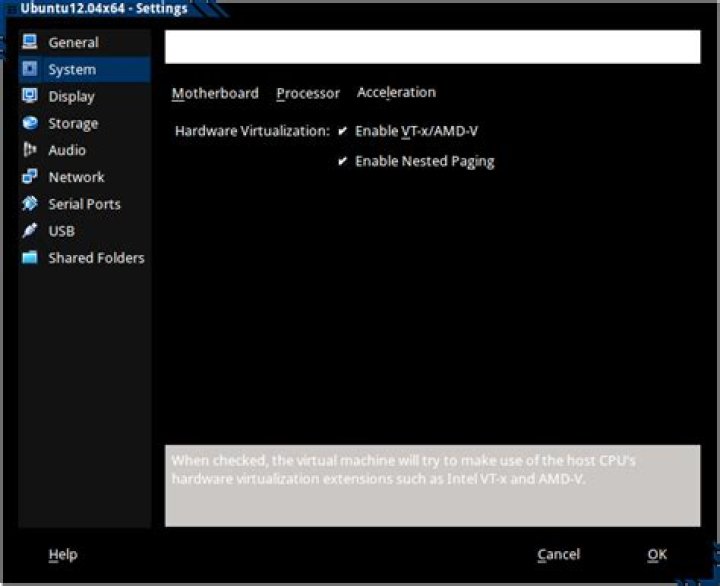
In VirtualBox click -> Settings -> System -> Acceleration and enable the checkboxes as shown below.
I had run into the very same problem and after spending like 2hrs I finally solved this. I am on a 32bit sys and my Bios does not have this Vizualization Technology option.
The problem happened to be VirtualBox related, I did this:
VirtualBox > System > Processor > change the number of processors from 2 to 1
Worked for me.
1I have an ASUS TUF B450 mobo and it's under Advanced -> CPU -> SMV
I also had to disable SecureBoot.