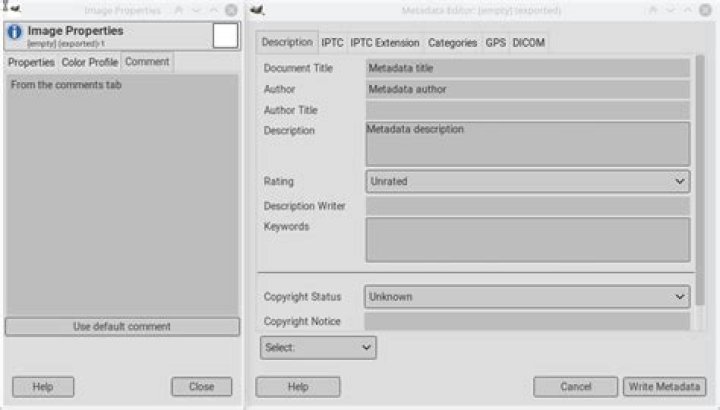
The version of GIMP I am using is 2.10.22. I used "image properties" to add a comment (caption) to my photos. I closed and saved the image. Next, I edited the metadata, then exported the XCF image to JPG. After exporting the photo, I get a pop-up showing a preview of the metadata and comments, so I clicked "export" again.
On my desktop, I go into my folders and open the exported JPG image. All I see is the image itself with no comments or metadata. Is that supposed to happen?
My professor has a program where she can see any photo added in with a caption. I've submitted all 3 of my JPG photos (exported from GIMP). So.. my question is: Will she be able to see all 3 captions and metadata from those photos? Or will she see JUST the photos?
It's my first time using this program..so I hope I did everything correctly.
My goal is to have her see everything. I'm on thin ice as of now..
13 Answers
You have not said which version of Gimp you are using but in my version (2.10.18) I can open an image and view the metadata by choosing menu option Image -> Metadata -> View Metadata so use that function to see what metadata your exported image has.
And when you export to JPG there are options on the export window Save Exif data / Save XMP data / Save IPTC data if you don't want any metadata in the exported image then un-check those boxes.
The default image viewer of Ubuntu 20.04 lets you see the meta data of images by clicing the three-lined button (top right corner), choosing Image Properties, and choosing the Metadata tab. Hope it helps.
There are two different things:
the JPEG comment. This is part of the JPEG standard itself, independently of the EXIF metadata. On Linux, the
filecommand displays it. In Gimp , this is the "Comment" inImage>Properties, and also the comment that you can enter in the JPEG export dialog.The EXIF/IPTC metadata: the EXIF-standard medata, which is Gimp is in the
Image>Metadatadialog.
So after filling these two dialogs with this:

You can check the result
*with the file command (see "description"):
file /tmp/empty.jpg /tmp/empty.jpg: JPEG image data, JFIF standard 1.01, resolution (DPI), density 300x300, segment length 16, Exif Standard: [TIFF image data, little-endian, direntries=8, description=From the comments tab, xresolution=132, yresolution=140, resolutionunit=2, software=GIMP 2.10.14, datetime=2020:11:19 12:04:25, GPS-Data], comment: "From the comments tab", progressive, precision 8, 400x400, components 3 or with the exiftool command (in the repos) (see "Comment", "Description", "Title", "Creator", "Image description":
exiftool /tmp/empty.jpg ExifTool Version Number : 11.65 File Name : empty.jpg Directory : /tmp File Size : 6.7 kB File Modification Date/Time : 2020:11:19 12:04:31+01:00 File Access Date/Time : 2020:11:19 12:04:31+01:00 File Inode Change Date/Time : 2020:11:19 12:04:31+01:00 File Permissions : rw-rw-r-- File Type : JPEG File Type Extension : jpg MIME Type : image/jpeg JFIF Version : 1.01 Exif Byte Order : Little-endian (Intel, II) Image Description : From the comments tab X Resolution : 300 Y Resolution : 300 Resolution Unit : inches Software : GIMP 2.10.14 Modify Date : 2020:11:19 12:04:25 User Comment : From the comments tab Color Space : sRGB GPS Latitude : 0 deg 0' 0.00" GPS Longitude : 0 deg 0' 0.00" GPS Altitude : 0 m XMP Toolkit : XMP Core 4.4.0-Exiv2 Digital Source Type : Document ID : gimp:docid:gimp:243d0396-1a39-452e-9928-9e8ead6b184f Instance ID : xmp.iid:ab683835-93fb-4b83-b27b-7377bc343fa8 Original Document ID : xmp.did:8a5b06ea-f663-4db9-a56f-5c8ab1bbe735 Model Release Status : None Api : 2.0 Platform : Linux Time Stamp : 1605783871557164 Version : 2.10.14 Format : image/jpeg Creator Tool : GIMP 2.10 Location Created : Location Shown : Artwork Or Object : Registry ID : History Action : saved, saved History Changed : /metadata, / History Instance ID : xmp.iid:4f8c50bb-8928-455c-add3-f987de0a63fe, xmp.iid:89777edf-dae6-412f-883a-9fa73b3728e7 History Software Agent : Gimp 2.10 (Linux), Gimp 2.10 (Linux) History When : +01:00, +01:00 Image Supplier : Image Creator : Copyright Owner : Licensor : Creator : type="Seq" Metadata author Description : Metadata description Title : Metadata title Profile CMM Type : Little CMS Profile Version : 4.3.0 Profile Class : Display Device Profile Color Space Data : RGB Profile Connection Space : XYZ Profile Date Time : 2020:11:19 11:02:10 Profile File Signature : acsp Primary Platform : Apple Computer Inc. CMM Flags : Not Embedded, Independent Device Manufacturer : Device Model : Device Attributes : Reflective, Glossy, Positive, Color Rendering Intent : Perceptual Connection Space Illuminant : 0.9642 1 0.82491 Profile Creator : Little CMS Profile ID : 0 Profile Description : GIMP built-in sRGB Profile Copyright : Public Domain Media White Point : 0.9642 1 0.82491 Chromatic Adaptation : 1.04788 0.02292 -0.05022 0.02959 0.99048 -0.01707 -0.00925 0.01508 0.75168 Red Matrix Column : 0.43604 0.22249 0.01392 Blue Matrix Column : 0.14305 0.06061 0.71393 Green Matrix Column : 0.38512 0.7169 0.09706 Red Tone Reproduction Curve : (Binary data 32 bytes, use -b option to extract) Green Tone Reproduction Curve : (Binary data 32 bytes, use -b option to extract) Blue Tone Reproduction Curve : (Binary data 32 bytes, use -b option to extract) Chromaticity Channels : 3 Chromaticity Colorant : Unknown (0) Chromaticity Channel 1 : 0.64 0.33002 Chromaticity Channel 2 : 0.3 0.60001 Chromaticity Channel 3 : 0.15001 0.06 Device Mfg Desc : GIMP Device Model Desc : sRGB Comment : From the comments tab Image Width : 400 Image Height : 400 Encoding Process : Progressive DCT, Huffman coding Bits Per Sample : 8 Color Components : 3 Y Cb Cr Sub Sampling : YCbCr4:2:0 (2 2) Image Size : 400x400 Megapixels : 0.160 GPS Position : 0 deg 0' 0.00", 0 deg 0' 0.00"